
What’s New in Microsoft 365 Copilot
Microsoft Ignite 2025 delivered the biggest leap forward for Microsoft 365 Copilot yet.
It confirmed that over 400 new Copilot features have been added since launch. This year’s announcements focus on one theme, i.e.,
Copilot is moving from a simple AI assistant to a full intelligent agent system built directly into Word, Excel, PowerPoint, Outlook and Teams.
This blog walks through the major Copilot announcements from Ignite 2025. Let’s find out what’s new, what’s coming soon and what it means for how we work.

Word, Excel and PowerPoint Agents – Frontier-Exclusive First Look
Ignite 2025 introduced dedicated Word, Excel and PowerPoint Agents inside Microsoft 365 Copilot Chat. Besides generating the text and slides, these agents guides users through the process by asking targeted follow-up questions that clarify goals, preferred structure and the type of content needed.
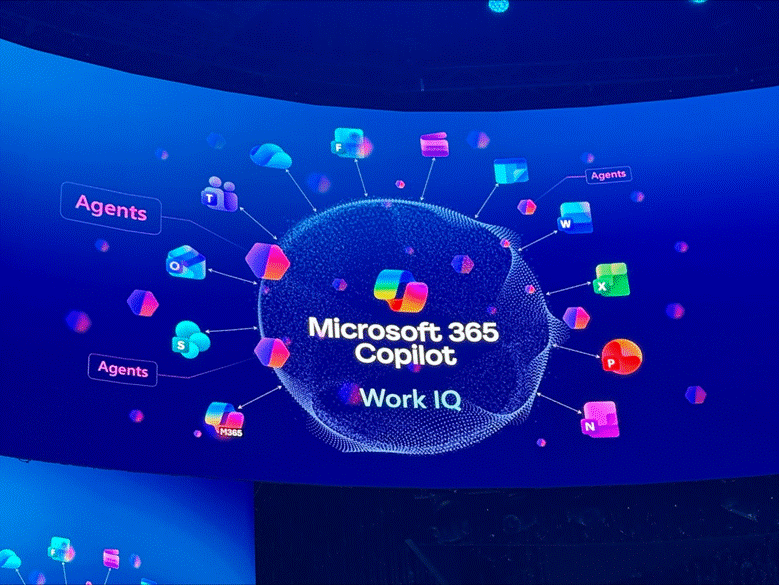
Each agent brings specialised capabilities. For example:
- Excel Agent can turn data into charts, summaries and insights using built-in formulas and logical reasoning for project planning and decision-making tools.
- Word Agent is designed to organise complex information into well-written documents, powered by Work IQ for deeper understanding of organisational files and context.
- PowerPoint Agent focuses on storytelling and visual structure to build executive presentations, strategic updates and market-focused decks.
These new Office Agents are available through the Frontier program for Microsoft 365 Copilot customers. The access will expand soon to Frontier for Microsoft 365 Personal, Family and Premium subscribers.
Agent Mode Comes to PowerPoint, Excel and Word
Please scroll down a bit to see the video “Welcome to Agent Mode in Excel” and“Meet PowerPoint Agent”
Microsoft also expanded Agent Mode, which lets Copilot co-create directly inside apps. These include:
- PowerPoint Agent Mode, now in Frontier, can update branded decks, rewrite slides, insert tables and images and rearrange content. It also pulls context from files, meetings and emails to build new presentations.
- Excel Agent Mode is available on web, Windows and Mac. It includes integrated web search for importing external data and allows users to choose between Anthropic and OpenAI reasoning models.
- Word Agent Mode, now generally available, uses Work IQ to automatically select relevant files, emails and meeting notes so documents stay accurate and up to date. It works across desktop and web, including Mac.
Outlook Gets Smarter with Voice, Scheduling and One-Tap Actions
Scroll down a bit further to see “Meet Voice in Copilot”
We can also use the starting 16 seconds of this video about “summarising emails”
Copilot in Outlook received several upgrades for faster communication and simpler scheduling.
- On mobile, Copilot now offers voice triage to summarise unread emails, draft replies and manage the inbox completely hands-free.
- Across Windows, web, iOS, Android and classic Outlook, users can tap into new one-tap prompts such as Triage my inbox, Summarise and reply and What needs my reply?
These shortcuts come with the most relevant actions without navigating menus.
Scheduling also becomes easier.
Users can now schedule meetings directly from chat as Copilot can find suitable times, book rooms, create agendas and send invites. Copilot can also resolve scheduling conflicts by automatically moving flexible meetings and notifying users of the changes.
Copilot Notebooks Are Now More Collaborative
Copilot Notebooks gained several new capabilities through the Frontier program. These include:
- An overview page that highlights live updates and key changes to stay aligned as documents evolve.
- A Video Overview that generates quick, AI-powered visual summaries of Notebook content.
- Users can now share Notebooks across their organisation for co-authoring for easy collaboration in one workspace.
- Copilot will also suggest new Notebook topics based on recent activity and priorities.
Copilot Chat Evolves with Pages, Creation Tools and Secure AI
Microsoft expanded what Copilot Chat can create, starting with Copilot Pages.
It can turn prompts into interactive documents, reports and prototypes. Copilot can write code directly onto the page, and you can export the result to PowerPoint for presentation-ready output.
Copilot Chat also received several secure AI upgrades. For example:
- Chat now runs on GPT-5 with automatic model routing for more accurate reasoning.
- Grounding has been strengthened for long documents, PDFs, images and uploaded files.
- Bing web search is integrated with strict privacy controls to ensure customer data is not used for model training.
- You can also access new interactive cards for weather, markets, sports and news, along with voice interaction on desktop and web for hands-free prompts and replies.
Sora 2 and AI Video Creation Inside Copilot
Ignite confirmed the integration of Sora 2 inside the Copilot Create experience. Users can now generate AI-produced video clips directly from natural language prompts or replace existing stock footage with AI-generated scenes. Copilot supports built-in voiceover, music and brand kits to make sure the video content matches organisational guidelines and visual identity.
SharePoint Creation via Copilot Chat
Copilot Chat can now create SharePoint pages and lists through simple natural language commands.
Examples include:
- Generating campaign pages
- Building lists of top-selling products by geography
- Producing location-specific reports
These capabilities are available to Frontier enterprise customers.
Copilot Business for SMBs
Microsoft introduced Copilot Business, a new option designed for organisations with fewer than 300 users. Priced at 21 USD per user per month, it brings Copilot’s core capabilities to small and midsize businesses without added complexity.
Copilot Business automates everyday tasks such as summarising emails, drafting documents, analysing data and preparing meeting notes. Customers can also add specialised agents to handle processes and routine workflows, so the teams focus more on customers and strategic work.
Copilot as Teammate and Operator
Ignite also showcased Microsoft’s broader vision for Copilot as both a teammate and an operator inside the workplace.
New Teams features support multi-user reasoning, shared channel agents and meeting facilitators that help groups collaborate with AI in real time.
On the operational side, tools like Opal automate complex tasks such as onboarding, compliance reviews and auditing.
New Workforce Insights agents assist leaders with organisational design, staffing decisions and skills planning.
Final Words – Copilot Moves Beyond Assistance
The updates at Ignite 2025 point to one direction. Copilot is getting faster, smarter and far more helpful across the tools people use every day. With new agents and stronger reasoning, it is becoming easier to work, create and collaborate inside Microsoft 365.