Microsoft Ignite 2025 showed where Power Platform is headed and it is growing faster than we expected.
According to Microsoft, 56 million people now use Power Platform every month, which is a 27 percent jump from last year.
A lot of that growth comes from everyday makers using the built-in AI tools to build apps or automate small tasks they never had time for before.
This year’s announcements focused on making the Power Platform faster, more capable and ready for AI-driven development at scale.
In this blog, we will break down the major Power Platform updates from Ignite 2025 and what they mean for makers and organisations.
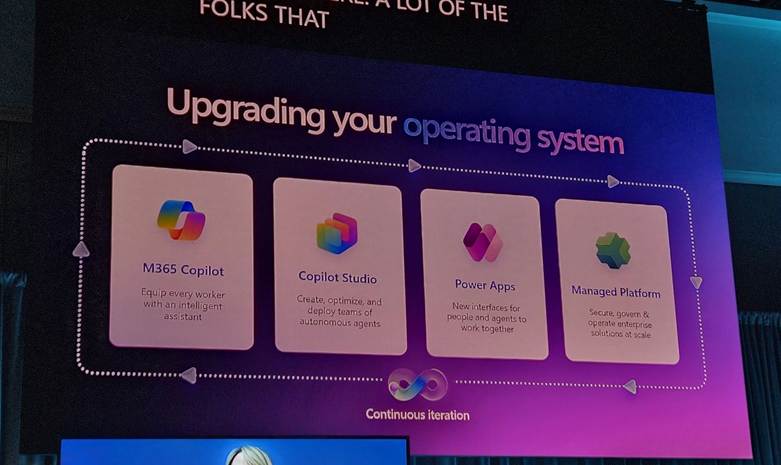
Power Apps: Native Copilot and Production Grade Features
Power Apps moved further into an AI-assisted development model this year. Besides that shift, Microsoft updated the design system and added monitoring features.
1. Copilot for App Building
Ignite 2025 continued Microsoft’s push to make Copilot the starting point for building apps. Makers can describe what they need in simple language, and Copilot generates the basic structure for both canvas and model-driven apps.
It also handles forms and screens. The editor now supports more conversational refinements, so adjusting layouts or adding data elements feels more natural and less manual.
2. Updated Controls and Design Features
Power Apps also picks up a stronger set of modern controls and improvements to responsive layouts. Styling is more consistent across form factors, and the mobile experience has been tightened to improve loading speed and smooth interactions.
Model-driven apps benefit from cleaner visuals and updated page templates. Collaboration gets a boost too, with deeper ALM support and simpler integration with GitHub and Azure DevOps for teams working across multiple environments.
3. Enterprise Performance and Monitoring Upgrades
To support larger deployments, Microsoft expanded the performance and monitoring tools inside Power Apps. The performance analyser gives clearer insight into slow screens, heavy queries or controls that need adjustment.
Diagnostics are easier to access and admins gain more built in monitoring options to track and maintain performance at scale without relying on external tools.
Power Automate: Hyperautomation with AI and Orchestration
Power Automate gained several updates that strengthen how teams build, analyse and scale automation across their systems.
1. AI Enhanced Flow Building
Power Automate continues to push deeper into AI-assisted automation. Copilot now goes beyond simple suggestions and can generate full multi-step workflows, including approvals and conditional logic. Makers can adjust these flows through natural language.
Microsoft also introduced two helpful additions inside the editor:
- Flow repair, which helps troubleshoot broken flows
- Flow explanation, which breaks down what a flow is doing in plain language
2. Better Insights and Process Tools
Process mining receives refreshed dashboards that make it easier to spot bottlenecks and repetitive tasks worth automating.
Microsoft added new connectors and richer insights for systems like ERP, CRM and HR, so organisations get a clearer picture of how work moves across those applications.
The platform also leans further into agentic automation, where flows can start adapting to patterns and optimising steps without heavy manual tuning.
3. RPA Enhancements
For desktop automation, RPA gets two notable upgrades. Recording is faster and picks up actions more consistently. The runtime also becomes more resilient, with built-in exception intelligence to handle common errors and keep automations running more reliably.
Copilot Studio: Agents Become First Class Citizens
Copilot Studio moves deeper into agent-based automation. It introduces features that help makers build smarter workflows. For example:
- Support for multi-agent workflows, with each agent handling specific tasks, like calling APIs and responding to events
- Agents can coordinate with Microsoft 365 Copilot when the scenario requires shared context
- Ability to create custom skills using Azure AI Foundry models
- Event-driven triggers that allow agents to act proactively instead of waiting for prompts
- Centralised monitoring for conversation logs, analytics and performance
Read our Copilot roundup for the full AI agent updates.
Dataverse Enhancements for AI and Governance
Dataverse receives updates on scaling AI workloads to improve search capabilities and strengthen governance for organisations with strict security requirements.
1. AI Ready Dataverse Improvements
Microsoft expanded Dataverse’s role as the primary data platform for AI-driven applications. It integrates more deeply with Azure AI Foundry.
Vector search and RAG capabilities are improved and available natively, which helps apps deliver more relevant results without using external systems. Dataverse also introduces optimised storage tiers to support larger datasets and heavier AI workloads.
2. Governance and Compliance Updates
Dataverse adds more advanced access controls and tighter environment-level security, along with improved auditing to track how data is used across apps and automations. New capabilities built for regulated industries give organisations more confidence when handling sensitive or tightly governed data.
Power Pages: A More Modern and Secure Web Platform
Power Pages receives updates that improve how sites are built, extended and secured, with a mix of AI assistance and stronger controls for enterprise teams. Here are the key changes:
- Copilot can generate layouts, navigation and forms for new sites
- Content updates are faster using natural language prompts
- Better ALM support for structured deployments
- Visual Studio Code integration for a smoother developer experience
- More flexibility for pro developers through the Fusion Dev model
- Stronger web application firewall to protect public sites
- Expanded DDoS protection
- New built in compliance configurations for regulated industries
Fusion Development: Power Platform + Pro Code
Fusion development received updates that strengthen how low-code and pro-code teams work together across the platform. The major improvements include:
- Deeper GitHub and Azure DevOps integration for source control to branch and pull request workflows
- Better CLI tooling to support pro developers working across multiple environments
- A converged component library that can be reused across Power Apps, Power Pages and Copilot Studio
- More consistent patterns for extending solutions using custom code alongside low-code assets
Governance, Security and Managed Environments Upgrades
Governance continues to be the main focus for enterprise-scale Power Platform deployments. Ignite introduced updates that give admins more visibility and tighter control. Here is what’s new:
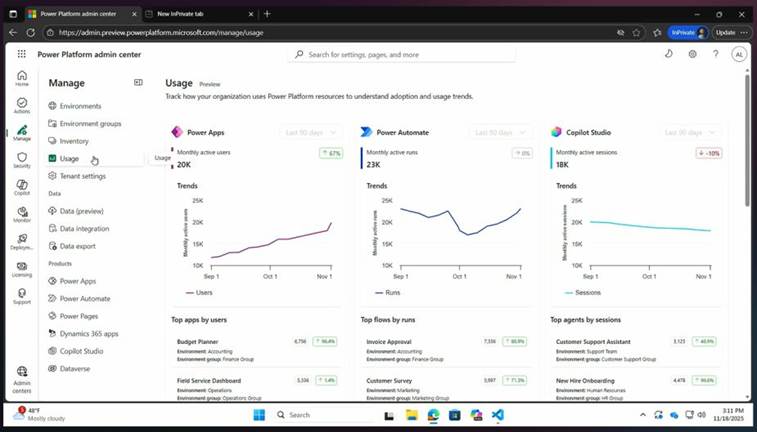
- New analytics inside Managed Environments for monitoring usage and environment health
- Policies that manage app lifecycle, automation limits and agent behaviour
- Administrator Copilot offering recommendations and remediation options
- Cross-platform visibility covering apps, flows, agents and data estate
- More consistent governance across environments to support regulated and large-scale organisations
Final Words – Power Platform Advances Without the Noise
Ignite 2025 did not try to reinvent Power Platform, instead, it focused on tightening what people already use every day.
Apps are quicker to build, automation runs with fewer issues, Dataverse handles heavier workloads and admins finally get clearer oversight.
It is a steady step forward, but one that will matter as more teams rely on the platform. The next year should show how these updates play out in real projects.